Check a trimmer running slowly
Check external head movement and excess nylon length with the battery removed, then record whether a separate normal-use check is needed.
Version 2.0.0. Required observations are marked *. Your answers stay in this browser.
1. Match the model and parts
Remove the battery. Find LST300 and the adjacent type number on the tool label. Compare the guard, cap, spool and assembly figures with the linked LST300 manual. Use ServiceNet for your exact type if they differ. LST300 is not a bump-feed head.
Region: US
Parts: Automatic-feed head with AF-100 spool; match model and tool type to manual
Not covered: LST420 / LSTE525; GH corded models; Dual-line heads; Metal line or blades; Nonmatching tool type or modified head; Unknown tool type or missing exact-type manual; Bump-feed conversion.
Choose the versions you can confirm.
Compare versions →2. Prepare
Keep the battery removed if the exact type/manual match is unknown or parts differ from the figures. Stop for a damaged battery, exposed wiring, a faulty switch, cracked guard, broken spool/hub, damaged cap tabs or housing slots. Use an authorized service center. Never open the battery, motor housing or charger.
Consumables and fit
No replacement consumable is required for this check. Damaged parts need an exact-type match through manufacturer support.
3. Follow your checks
Match the model and preparation to start.
Read all possible routes
Is the battery removed, the trigger released and the cutting head stopped, with no battery damage, exposed wiring or faulty switch?
- Yes — Keep the battery removed for every hands-on step.
- No — Stop using the tool for electrical, battery or switch damage. If you have only omitted battery removal, make the tool safe before restarting.
- Not sure — Keep the battery removed. Save your preparation record and check the matching manual before continuing.
Have you matched the label LST300 AND its exact tool type to the official lookup manual and its figures, with the original AF-100 automatic single-line head?
- Yes — Record the label type and matching manual reference in the first step.
- No — An unknown type, unavailable type manual, different figures, bump-feed head or dual-line conversion blocks this procedure. Use manufacturer support to identify the correct instructions.
- Not sure — Keep the battery removed. Save your preparation record and check the matching manual before continuing.
Did the tool run slowly without burning smell, smoke, damaged wiring or battery damage?
- Yes — Check only the manual’s accessible mechanical causes.
- No — An electrical or battery warning ends this external check.
- Not sure — Keep the battery removed. Save your preparation record and check the matching manual before continuing.
Are the guard and cap secure enough to inspect the head safely?
- Yes — Check the stopped housing and line length.
- No — Repair damaged retention parts before any operation.
- Not sure — Keep the battery removed. Save your preparation record and check the matching manual before continuing.
4. Follow and record
Complete the checks before recording physical work. Follow steps in order.
Record the exact tool and make it safe
Release the trigger, let the head stop, engage the lock-off and remove the battery. Leave it removed throughout hands-on care. Keep fingers away from the sharp cutter on the guard. Read LST300 and the tool type from the label. Open the official model/type lookup and compare its manual and parts figures with your actual guard, single-line head and AF-100 spool. A readable model name alone does not establish the type. If the exact type manual cannot be obtained, or any figure differs, save a preparation record and stop.
Look for: The battery is physically separate from the tool; your label type and matching manual reference are written below.
Manual: Official model/type lookup instructions; type is beside or below the model numberNote the symptom before cleaning
Record when slow running occurred and whether long line or heavy grass was visible. Keep the battery out throughout the inspection. Slow running alone does not identify a battery or motor failure.
Look for: The original symptom is recorded before any change.
Manual: English p10 Trimmer runs slowlyCheck the stopped spool housing
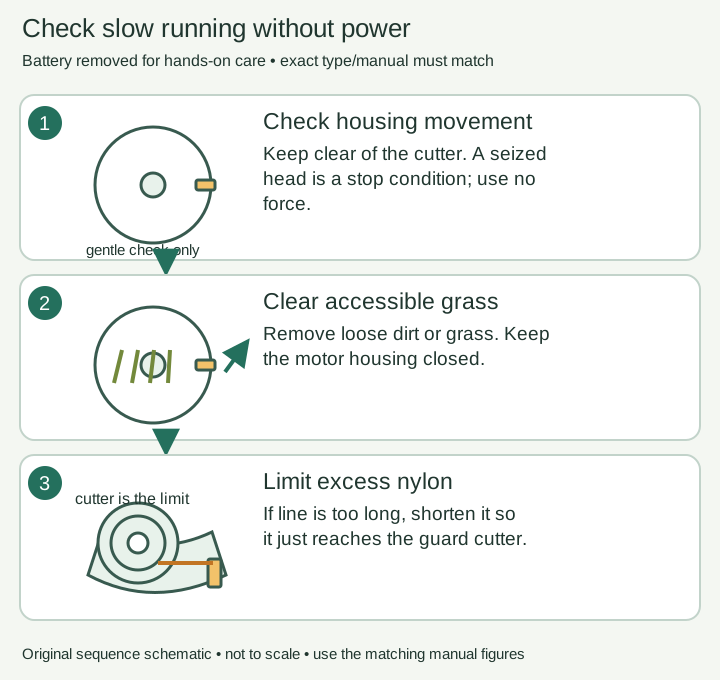
Carefully check whether the spool housing rotates freely as the manual instructs, with hands clear of the guard cutter. Do not force a seized housing or use pliers on the head.
Look for: Movement is free or binding is clearly recorded; no powered test is used for this check.
Manual: English p10 Trimmer runs slowlyClear accessible material
Carefully remove loose dirt or grass that is restricting the accessible housing. If it cannot be cleared gently, stop for service. Use the housing-cleaning task for dirty external air slots.
Look for: Only accessible debris has been removed; an internal obstruction is not pursued.
Manual: English p10 Trimmer runs slowlyCorrect excessive line length
Check the nylon projection against the manual’s approximate 5-3/8 inches (136 mm). If it is excessive or reaches past the guard cutter, use scissors to cut it so it just reaches the cutter. Avoid the blade itself.
Look for: The line reaches no farther than the cutter and is still the specified round nylon.
Manual: English p10 Trimmer runs slowlyRecord the unpowered result
Record whether free movement and line length were restored. Keep the battery out and complete after-care before normal use. If the housing binds or slow running recurs, end the test and request service.
Look for: The saved result states the external checks and does not claim an internal diagnosis.
Manual: English p10 Trimmer runs slowly
5. Keep your result
Record what you observed. A completed checklist does not certify that equipment is repaired.
When to check again
Trimmer runs slowly
Inspect when the stated condition occurs. The manual gives no fixed day or month interval.
Manufacturer guidance · English p10 Trimmer runs slowlySources & fit
- BLACK+DECKER LST300 instruction manual (manufacturer document, retailer-hosted)English p10 Trimmer runs slowly · Checked 2026-10-13
- BLACK+DECKER: locate a manual using model and type numberOfficial model/type lookup instructions; type is beside or below the model number · Checked 2026-10-13
- BLACK+DECKER LST300 product and supportLST300 model identity; Automatic Feed Spool; Includes AF-100 · Checked 2026-10-13
Independent, AI-assisted guidance. No physical repair trial is claimed. Manufacturer instructions for your exact version take priority.